The roadmap has had "in-game config GUI" sitting under Planned. Well, it's actually happening now, so here's a first look at what's coming for v0.4.
Up until now, tweaking MotionCab meant alt-tabbing out of the truck, opening motioncab.ini
in a text editor, changing a number, tabbing back in, reloading, and hoping it
felt right. Rinse and repeat for every setting. That loop? Gone.
What it does
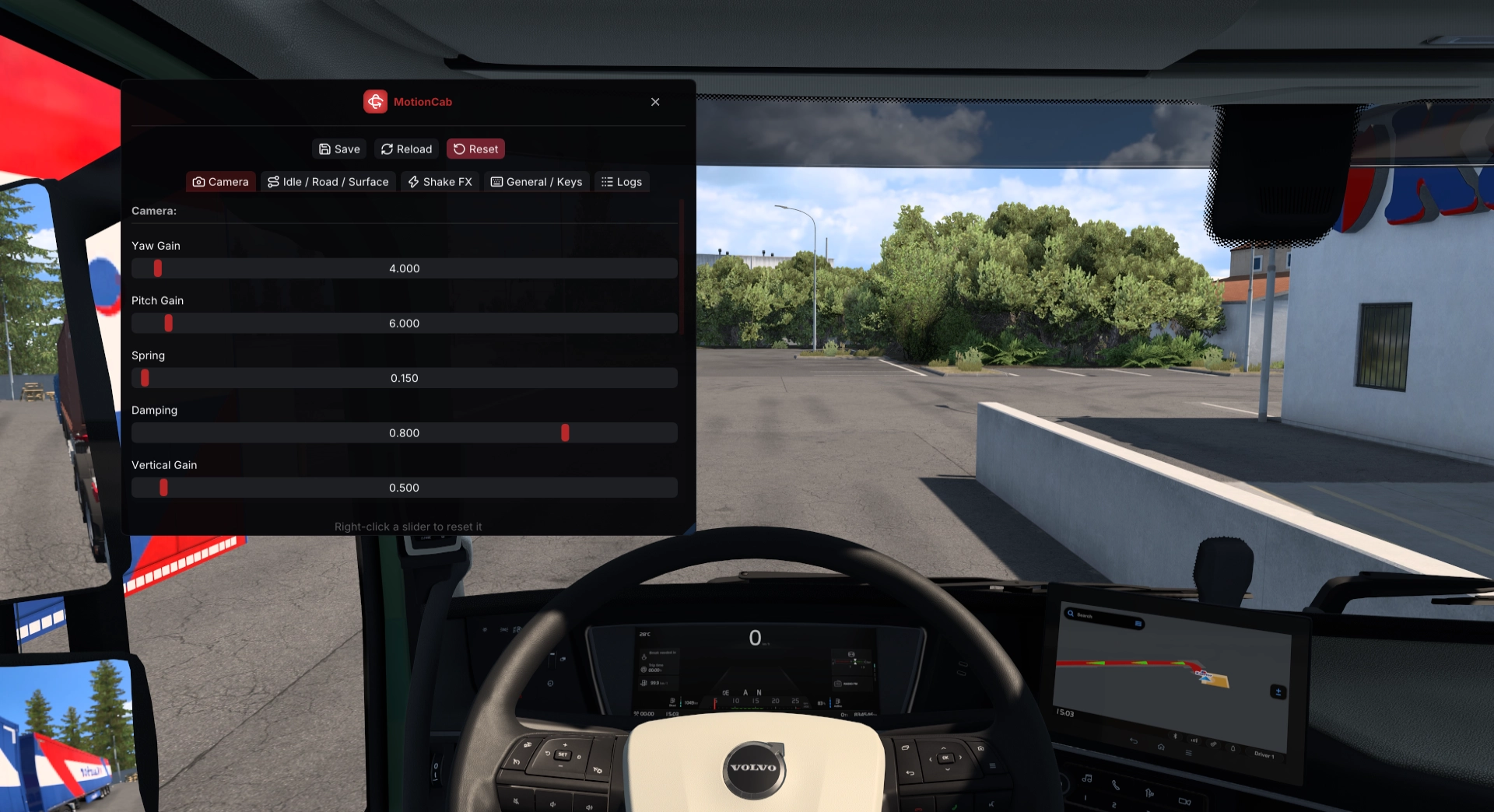
Press a key (F9 for now), and an overlay pops up right over the cab, packed
with sliders for every camera, road-feel, and shake setting MotionCab has. No
more editing motioncab.ini by hand, tabbing back into the game, and
reloading just to test a value. Change something, feel the difference next
frame, then:
- Save it to
motioncab.ini - Reload to discard changes and pull the file back in
- Reset everything to defaults
Every slider remembers its default; right-click to snap it back instantly. A small dot marks anything you've tweaked, so you can scan a tab and see exactly what's changed at a glance. Each button also flashes briefly when clicked, just to confirm your input registered.
Five tabs, nothing hidden
No endless lists. Everything's grouped by what it affects:
- Camera
- Idle / Road / Surface
- Shake FX
- General / Keys
- Logs
Hover for context
Every slider has a tooltip pulled straight from motioncab.ini's own
comments, so the description (and the slider's min/max) stays in sync with
the file. Rebinding a key? Click, press the new combo, done. Hold Ctrl,
Shift, or Alt for combos, Esc to cancel, or right-click to reset to
default, same as the sliders.
Doesn't fight the truck
ETS2/ATS hides and re-centers the mouse cursor every frame for free-look, which usually means overlays have to fight the game for mouse input. Opening the GUI releases the cursor and swallows the game's look-around input while it's up, so you can drag a slider without the camera spinning wildly. Close it, and everything goes back to normal. Wheel and pedal input? Still works the whole time; only the mouse is intercepted. Reloading is also smart about timing: it hands off to the simulation thread at the start of the next frame, so live physics (head position, active shake) don't jump mid-drive just because you clicked a button.
Under the hood
The overlay itself is Dear ImGui, using
its Win32 and DX11 backends (immediate mode), so every frame redraws the UI
from scratch. Getting ImGui on screen required some tricks: MotionCab runs
in-process (SCS's telemetry SDK loads it directly), so on startup, it
creates a throwaway D3D11 device and swapchain to read the real addresses
of IDXGISwapChain::Present and ResizeBuffers off the shared vtable:
void **vtbl = *reinterpret_cast<void ***>(swap);
*out_present = vtbl[8];
*out_resize = vtbl[13];
MinHook then inline-hooks both addresses:
MH_Initialize();
MH_CreateHook(present_addr, (void *)hkPresent, (void **)&oPresent);
MH_CreateHook(resize_addr, (void *)hkResizeBuffers, (void **)&oResizeBuffers);
MH_EnableHook(MH_ALL_HOOKS);
From there, every frame the game presents also renders the GUI on top if it's open. Right now, it's DX11 only, since that's what the engine uses in tested setups, and other rendering paths aren't hooked yet.
Reading real mouse input while the game fights for the cursor needed the
same trick twice more: SetCursorPos/ClipCursor are hooked process-wide
so the game can't keep re-clipping the cursor, and the mouse's DirectInput8
GetDeviceState/GetDeviceData are intercepted by creating a throwaway
mouse device to read their addresses off its vtable. Hooking that vtable
affects every DirectInput device class, so each call checks the device
type first:
static bool is_mouse_device(IDirectInputDevice8W *self) {
  DIDEVCAPS caps = {};
  caps.dwSize = sizeof(caps);
  if (FAILED(self->GetCapabilities(&caps)))
    return false;
  return GET_DIDEVICE_TYPE(caps.dwDevType) == DI8DEVTYPE_MOUSE;
}
This is also why wheel and pedal input keep working untouched while the GUI has the mouse.
Still a work in progress
This isn't in a release yet. Sliders, tabs, and the toggle key might change before it ships. DX11-only support means it won't show up for people who use OpenGL, and it needs more testing across different wheels, pedals, and multi-monitor setups.